Social americano nights and proper club opens use the same tools. You set the format, open registration, and the draw, the courts, and the table stay in one place.
The draw is generated for you. You pick the shape of the day. You do not build the bracket in a spreadsheet.
KnockoutA straight elimination bracket. One loss and that pair is out.
Qualification, then knockoutA qualifying round feeds the main draw, for fields that need a cut before the bracket.
Group stage, then knockoutPairs play inside groups, then the qualifiers move into an elimination bracket.
Round robinOne group. Every pair plays every other pair. The table decides the winner.
AmericanoRotating partners. Points are counted per player, which is the usual shape for a social night.
Scheduling
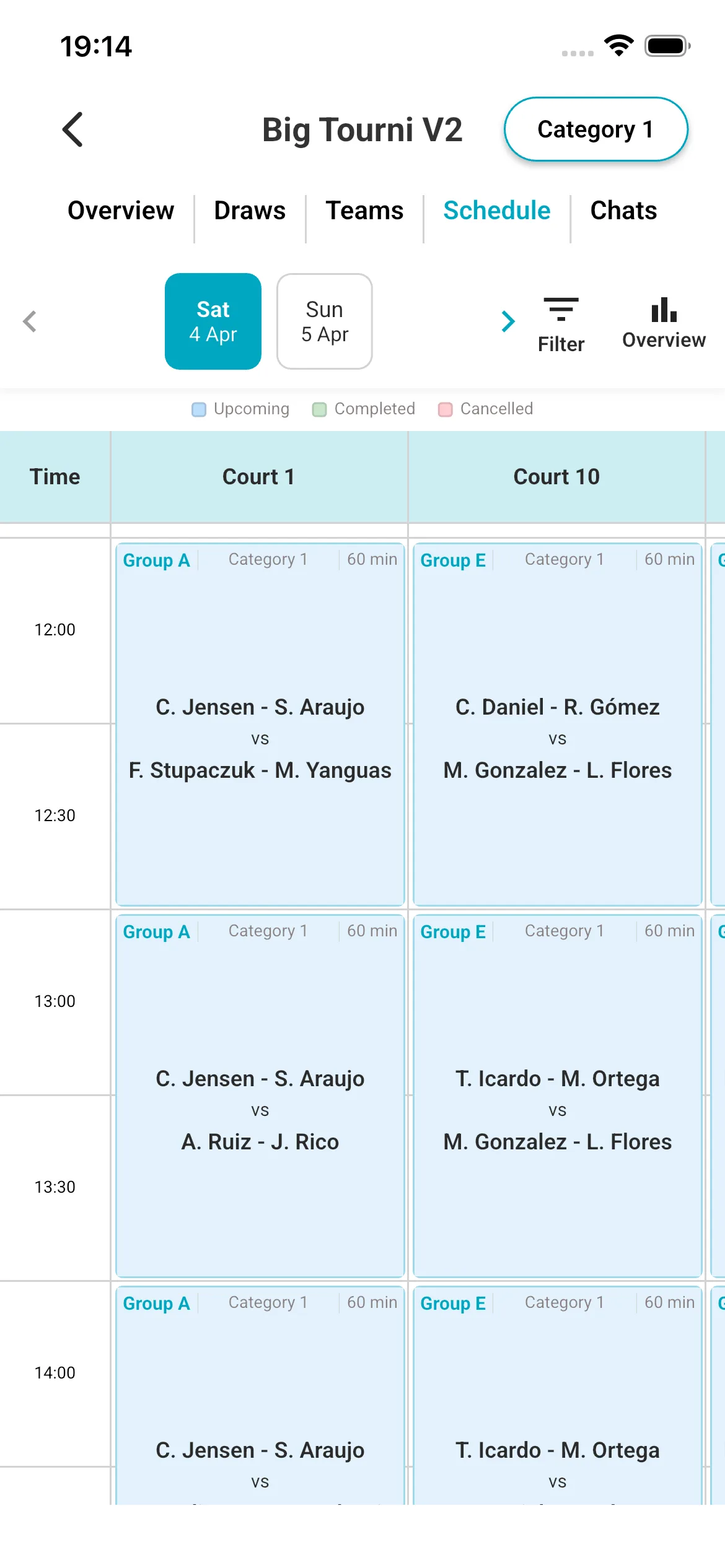
The schedule knows how many courts you have and how many pairs are in. Matches land on a court and a time, and players can see both.
Court-awareThe generator uses your court count and the size of the field, so you are not fitting a 32-pair day onto two courts by hand.
What players seeTime, court, opponent, and how long the slot is. Upcoming, completed, and cancelled matches are marked.
Completion at a glanceA schedule overview shows how many matches are done, still scheduled, or not placed yet, including a count per pair.
Payments
You choose how the entry fee is collected. The amount is visible before a player joins.
Stripe, in the appPlayers pay the registration fee online before they arrive. Refunds and cancellations are handled in the app, and the host is notified when a team cancels inside the deadline.
Or outside the appCash at reception, a bank transfer, or your own checkout. Mark the team as paid so the entry list stays honest.
No extra platform cutOrganiser plans do not add a fee on top of the entry. On club plans there is no platform commission on bookings either. Card processing fees from Stripe still apply, and they vary by country.
Registration
Players can enter with a partner from a link. You can also put teams in yourself.
A link is enoughShare the event. Players register and pay, or you add guest teams when someone signed up on paper.
The app is optional for watchingAnyone with the link can follow the draw, the next court, and the table in a browser. Chat, availability, and in-app payment live in the app.
Live results
When a score is entered, the bracket and the table move. Players do not wait for someone to post a photo of a whiteboard.
Brackets and tablesStandings update after the match. The same view is what people follow from the web link.
Share the resultA player can turn that result into an image and share it, instead of cropping a screenshot.
Communication
The event has its own places to talk, so the useful messages are not buried in a club-wide group chat.
AnnouncementsHost-only notes. Players can read them. They cannot reply inside that thread.
Chat on the division and on the matchA thread for the group, and a thread for the two pairs who actually have to agree a court.
NotificationsFixtures, results, and table changes reach the people who are in the event.
Availability
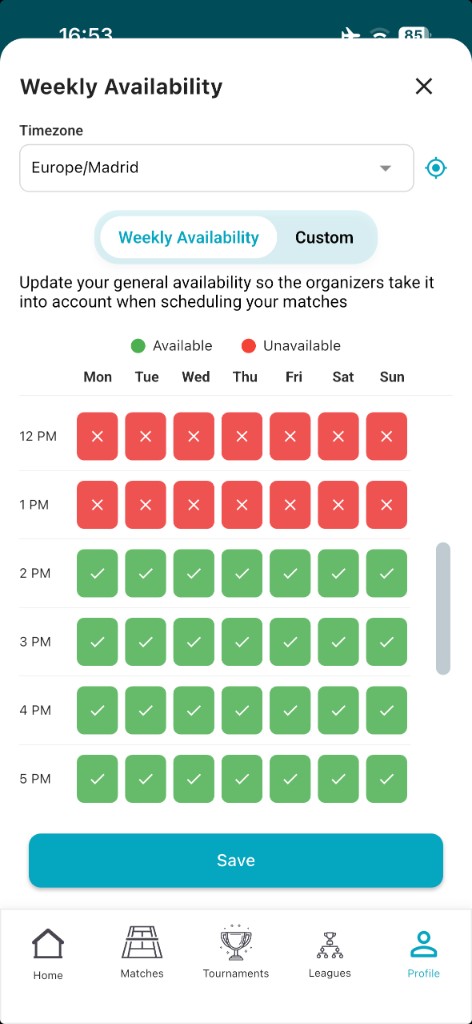
Players mark when they can play. You build the day from that, instead of polling the same question in chat.
Green and red slotsA player sets the windows they can make. The organiser sees it while the schedule is still movable.
Collaboration
Match day is rarely one person. You can add other managers to this tournament only.
Scoped to the eventThe people you add can help with that tournament: the entry list, the draw, the schedule, the results. They do not become managers of every other event you run.
Who this is forA club host and a volunteer. Two organisers splitting a weekend. A federation contact who should see one competition, not your whole account.
Leagues
A season that updates itself
Leagues are the long version of the same desk: fixtures, a public table, payments that do not restart every Tuesday, and a place for the people who run it.
Club mode is a league organised around squads. It is for clubs, or groups of players, that compete as a unit.
Players join a squadInstead of entering only as a lone pair, a player belongs to a squad. A club can put more than one pair on court and still have one place in the competition.
The season belongs to the squadFixtures, results, and the table are read at squad level, so the club is the thing people follow, not a scattered list of pairs.
Same tools as any other leagueStandings, payments, chat, availability, and shared managers all sit on a Club mode season. You are not running the squads in a side spreadsheet.
Formats
You set the shape of the season when you create the league: who plays whom, how often, and how a win is scored.
Round robin, groups, knockoutsA full round robin, group stages, a knockout, or a mix. Divisions when the field is large enough to split by level.
Points you publish onceReward points and the scoring format are part of the league. The table uses them after every result, so you are not recalculating on Sunday night.
Standings
The table is public and it moves when a score is entered. A screenshot from last week is not a table.
Live leaderboardPlayers always see the current order. Anyone with the link can open it on the web.
Who is behindCompletion stats per team show scheduled matches against matches played, so a pair that has not started the month is visible without you chasing them one by one.
Payments
A season fee should be collected once, not renegotiated every match night.
Stripe for the seasonPlayers pay the registration fee in the app. Refunds and cancellations are handled there.
Or mark it paidIf the club already took the money at the desk, mark the team as paid and keep the list in the same place as the table.
Scheduling and availability
Most league admin is not the table. It is getting two pairs onto the same court.
Weekly availabilityPlayers set the slots they can play. You see that before you lock a fixture, so the group chat stops being a poll.
Fixtures from the setupOnce the league is published, fixtures and the schedule are generated from the divisions, the frequency, and the scoring format you set.
Communication
The same two layers as a tournament: a thread for the division, and a thread for the match.
Division chatRules, a weather call, a reminder that three matches are still open. It stays with the people in that division.
Match chatThe four players who need to agree a time have their own thread, with notifications when the fixture or the result changes.
Collaboration
Add other managers to one league. A season is long enough that one person should not be the only one who can enter a score.
One league, not the whole accountThe managers you add work on that league. A different tournament you run next month is not automatically theirs.
Typical splitThe club manager owns the season. A division lead enters results. Neither needs the other’s login.
Import and access
You can start from the pairs and points you already have, and players do not all need the app on day one.
CSV or ExcelBring teams and points in from a spreadsheet and continue the season where you left it. You can also add teams by hand.
Link, web, or appShare a join link. The table is viewable on the web. Availability, chat, and paying in the app are there for players who install it.
Clubs
Courts, members, and events on one calendar
Club plans are for the venue: bookings, open matches, pricing, and the same tournaments and leagues, without a platform commission on the money you take.
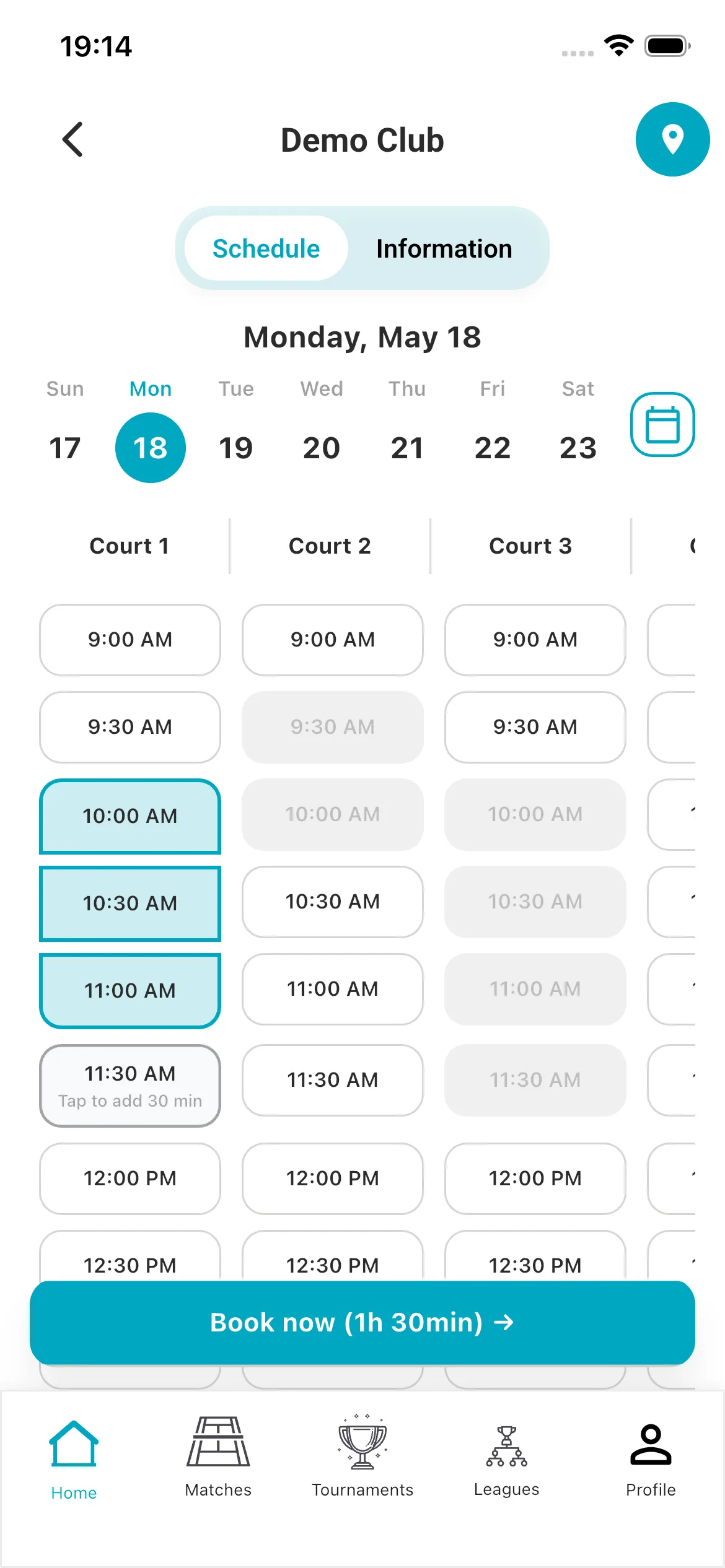
Players book a court from the app. Staff see the same day on one calendar, instead of a shared inbox and a paper sheet.
Courts, hours, rulesSet the courts, opening hours, and how a slot can be booked. Players pick a time and a duration.
Repeating bookingsA weekly reservation can follow a pattern, so staff are not re-entering the same academy slot every Monday.
One calendarPlayer bookings, bookings you enter by hand, coach lessons, closures, and tournament blocks sit on the same grid. Paid in the app and paid outside are both visible on the booking.
CoachesA coach can keep their own availability, so lesson slots stay lined up with the courts without a back-and-forth with the desk.
Open matches
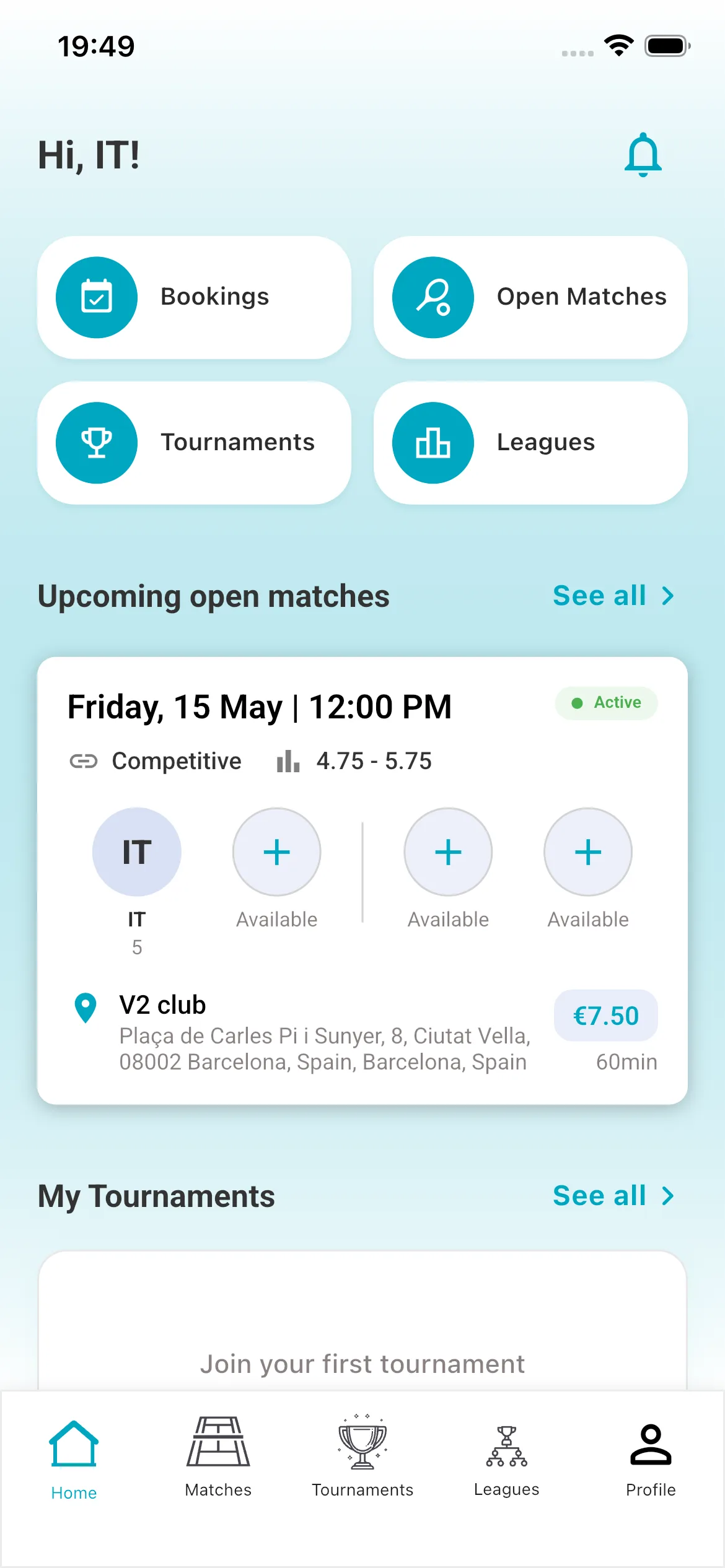
An empty fourth player is how courts stay dark. Open matches let someone post a game and fill the seats.
Post and joinA player creates an open match with a time, a level, and a price. Others join the open seats.
Your courts, in front of people looking for a gamePlayers browsing open matches see clubs that have a court. They can book it from the app.
Pricing and payments
The rate can change with the hour. The money can arrive in the app or at the desk.
Dynamic pricingSet a base price, then vary it by time of day and day of week. Peak hours do not have to cost the same as a Tuesday morning.
0% platform commissionClub plans do not take a cut of the booking. You keep the revenue after Stripe’s processing fee. Cash and other external payments are accepted too.
Leagues and tournaments
The club plan includes the event tools, so a Saturday open and the winter league are not a second product.
Included volumeClub plans include 3 leagues and 30 tournaments a month, with the same draws, schedules, standings, and payments as the organiser plans.
You do not need a club to run an eventAn organiser with no venue can still create a league or a tournament on an organiser plan. The club plan is for when the courts are yours.
Memberships
Pro is the plan where the club’s own name stays in front of the member.
Tiers you defineCreate membership levels with their own price and perks, instead of one flat rate for everyone.
White-label appPro includes a branded app experience, so members open your club, not a generic listing.
Analytics
The dashboard is the day in numbers: what is booked, what the events are doing, and what came in.
Utilisation and revenueBookings, revenue, peak hours, and player activity. Enough to see which hours are empty and which prices are doing the work.
Players
Join, follow, and show the score
A profile is free. Entry fees are set by the organiser or the club, and the player sees the amount before they join.
A player can enter from a link the organiser sent, or find events in the app.
Register and payBrowse the event, register, and pay in the app when the organiser has turned that on. If the fee was taken at the desk, the organiser marks it paid.
Cancel inside the windowA team reservation can be cancelled before the deadline for a full refund. The host is notified.
Following without the app
Parents, partners, and players who will not install anything can still see the day.
The web linkDraw, next match, court, and table. That view does not require an account.
The app, when they want the restAvailability, chat, paying, and notifications are in the app. One install covers every event they join later.
Availability and chat
The two things that usually happen in WhatsApp.
When they can playA player marks the week once. The organiser uses it. The player is not asked again in three different chats.
Who they can talk toA division thread, and a thread for the specific match. Announcements from the host stay read-only.
Share a result as an image
A result that only lives inside the app does not get shown to anyone who was not there.
An image, not a cropped screenshotThe player shares the result as a picture: something that reads clearly in a story, a chat, or a club post.
After the score is inThe image follows the result the event already has, so the number on Instagram matches the number on the table.
See it on your own event
Download the app and run a tournament or a league, or book a short call if you want to walk a season through first.
Essential cookies keep the site working. If you accept all, we also use analytics and advertising cookies. Essentials only uses privacy-friendly analytics without cookies. Privacy Policy